 3cfd1d23da
* Initial check in for SQL migration SKU recommendation feature (#18116)

Co-authored-by: Raymond Truong <ratruong@microsoft.com>

* add TargetSelectionPage, remove AccountSelectionPage, fix saveAndClose bugs (#18092)

* update sku interfaces (#18150)

* create the skuRecommendationResultsDialog (#18151)

* add TargetSelectionPage, remove AccountSelectionPage, fix saveAndClose bugs

* create skuRecommendationResultsDialog

* Replace placeholder SKU recommendation results with actual results (#18153)

* Replace placeholder SKU recommendation results with actual backend call results

* Remove skuRecommendationExample

* Replace number fields in interfaces with correct enums, and update UI text

* add getAzureRecommendationDialog for performance collection (#18159)

* add getAzureRecommendationDialog when there are no recommendations available

* update 'get azure rec' / 'view details' link values

* add condition to check if recommendations are available

* Implement start/stop perf data collection + import perf data into new UI (#18149)

* Implement start/stop perf data collection

* add getAzureRecommendationDialog when there are no recommendations available

* update 'get azure rec' / 'view details' link values

* add condition to check if recommendations are available

* Implement import existing data + start/stop perf collection with new UI

Co-authored-by: Rachel Kim <rackim@microsoft.com>

* Expose SqlInstanceRequirements in SKU recommendation results (#18207)

* Expose SqlInstanceRequirements

* Move string literals to constants file

* Fix formatting in mssql.d.ts

* create storage properties table (#18215)

* Edit sku recommendation parameters (#18244)

* Edit sku recommendation parameters

* make _targetPercentileDropdown not editable; styling updates

* Azure recommendation section exposes data collection status and stop option (#18246)

* Edit sku recommendation parameters

* create azure recommendation details section on sku page

* Improve error handling + add auto refresh + other small changes (#18228)

* Update source properties table

* WIP - refresh perf data collection

* Add auto refresh logic

* Address comments

Co-authored-by: Rachel Kim <rackim@microsoft.com>

* Show/hide azure recommendation components based on data collection source and status (#18254)

* add refresh recommendation button; show/hide content based on perf collection status

* show/hide azure rec content based on perf data source scenarios

* add popups for start/stop; allow user to restart data collection; add perf collection to save close; add info tooltips (#18278)

* Update SKU recommendation timer logic (#18281)

* Update timer logic

* Fix misc UI bugs

* update sql migration extension readme (#18295)

* Remove empty constant, as this may have broken the build

* Fix 'save and close' behavior for SKU recommendation (#18301)

* Update timer logic

* Fix misc UI bugs

* 'WIP'

* Add logic to restore correct SKU recommendation state when reloading

* SKU UX enhancements - status info, button validations, savedInfo logic (#18320)

* add stop/inprogress status icons to perf collection status text, update restart icon

* refactor savedInfo as an interface, edit parameter recommednations are saved, add open folder inputbox validation, handle no recommendations available scenario

* fix getazureredialog bug, cleanup cold

* nit card styling

* Update recommendations whenever user changes list of databases to assess + misc clean up (#18323)

* Consolidate constants, clean up redundant functions, misc clean up

* Remove old SKU recommendation interfaces

* Update some more strings

* Telemetry events for SKU Recommendation (#18282)

* Telemetry events for SKU Recommendation

* Addressing comments -
1) fixed camel casing
2) removed extra logging to console
3) added telemetry for subid, rg, tenantid on targetselectionpage

* Resolving conflicts

* Addressing comments - 1) removing filename 2) moving all numbers to measurements.

* Resolving comment - Fixing telemetry value for tenant id.

* removing warning 'logError' is declared but its value is never read (#18333)

* Stop existing data collection when leaving and starting a new migration + update timers (#18339)

* Refresh recommendations when pressing stop data collection button

* Fix orphaned data collection when save and closing and starting a new
migration

* Revert "Refresh recommendations when pressing stop data collection button"

This reverts commit e6fb2ade8f8a41952adb81cb0ee852414dfa4ef2.

* Update timers to use production values

* Remove unused import

* address bug bash issues: add learn more link, add last refreshed time, fix vm card view detail open issue, remember last selected folder, remove strings, refactor refresh logic on sku page (#18340)

* Address comments

* Update to sqltoolsservice 3.0.0-release.204

Co-authored-by: Rachel Kim <rackim@microsoft.com>
Co-authored-by: Neetu Singh <23.neetu@gmail.com>
4.3 KiB
Azure SQL Migration
The Azure SQL Migration extension in Azure Data Studio brings together a simplified assessment and migration experience that delivers the following capabilities:
- A responsive user interface that provides an easy-to-navigate step-by-step wizard to deliver an integrated assessment, Azure recommendation and migration experience.
- An enhanced assessment engine that can assess SQL Server instances and identify databases that are ready for migration to Azure SQL Managed Instance or SQL Server on Azure Virtual Machines.
- SKU recommender to collect performance data from the source SQL Server instance to generate right-sized Azure SQL recommendation.
- A reliable Azure service powered by Azure Database Migration service that orchestrates data movement activities to deliver a seamless migration experience with minimal downtime.
- The ability to run migrations in either online (for migrations that require minimal downtime) or offline (for migrations where downtime persists through the duration of the migration) modes to suit your business requirements.
- The flexibility to create and configure a self-hosted integration runtime to provide your own compute for access to source SQL Server and backups in your on-premises environment.
Installation
From Azure Data Studio marketplace, install the latest version of “Azure SQL Migration” extension and launch the wizard as shown below.
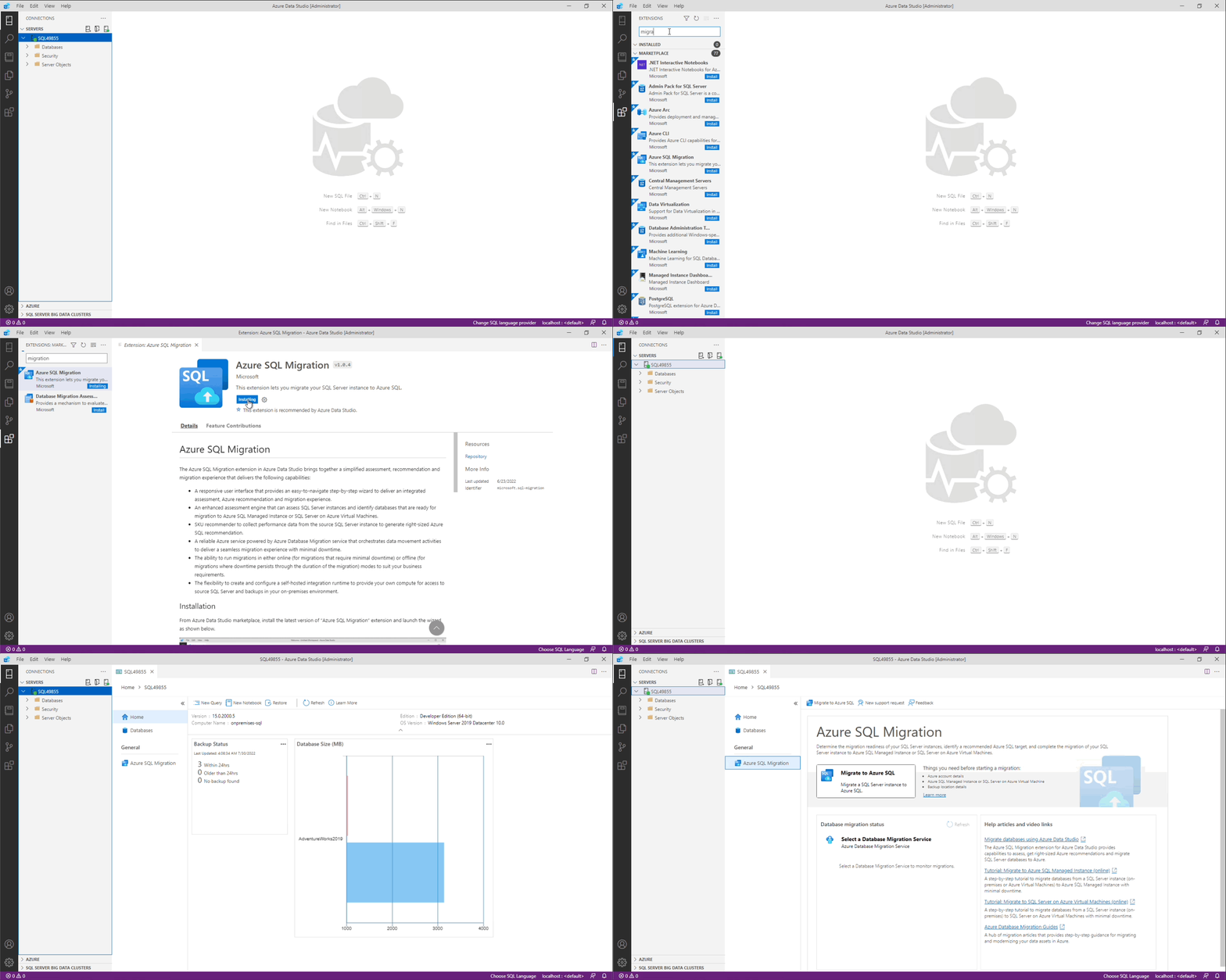
Things you need before starting Azure SQL migration
- an Azure account for migration (not required for assessment or SKU recommendation features)
- an Azure SQL Managed Instance or SQL Server on Azure Virtual Machine to migrate your database(s) to
- your database backup location details
Getting started
Refer to Migrate databases using the Azure SQL Migration extension for Azure Data Studio for detailed documentation on capabilities and concepts.
Assessment and SKU recommendation
The assessment and SKU recommendation feature
- evaluates the source SQL Server database(s) for migration readiness.
- generates right-sized SKU recommendations in Azure to meet the performance requirements of the source database(s) with minimal cost. Learn more.
Azure SQL targets
The Azure SQL Migration extension supports database migrations to the following Azure SQL targets.
Migration modes
The following migration modes are supported for the corresponding Azure SQL targets.
- Online - The source SQL Server database is available for read and write activity while database backups are continuously restored on target Azure SQL. Application downtime is limited to duration for the cutover at the end of migration.
- Offline - The source database cannot be used for write activity while database backup files are restored on the target Azure SQL database. Application downtime persists through the start until the completion of the migration process.
Need assistance or have questions/feedback
Refer to Get help from Microsoft support.
Code of Conduct
This project has adopted the Microsoft Open Source Code of Conduct. For more information see the Code of Conduct FAQ or contact opencode@microsoft.com with any additional questions or comments.
Privacy Statement
The Microsoft Enterprise and Developer Privacy Statement describes the privacy statement of this software.
License
Copyright (c) Microsoft Corporation. All rights reserved. Licensed under the Source EULA.