
Microsoft SQL Bindings for VS Code
Overview
Microsoft SQL Bindings for VS Code enables users to develop Azure Functions with Azure SQL bindings
VS Code
This extension is bundled into the SQL Server (MSSQL) extension for VS Code and will be installed automatically when that extension is updated or installed.
Getting Started with SQL Bindings
NOTE: Currently, the SQL bindings extension only supports C# Azure Functions. JavaScript and Python Azure Functions support SQL bindings but are not supported by the SQL bindings extension at this time.
From object explorer
- To create an Azure Function from a specific table in object explorer, right-click on a table in a connected server in object explorer and select
Create Azure Function with SQL Binding.If you have not yet created the Azure Function project, the process will create one for you before populating the Azure Function.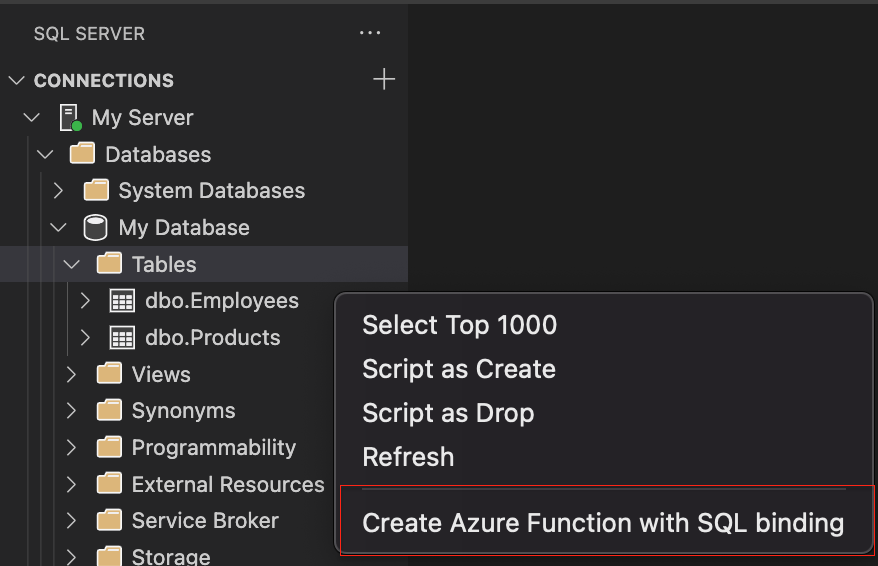
In an existing Azure Function
- Open the C# Azure Function in an editor and then run the
MS SQL: Add SQL Bindingcommand from the command palette to add a SQL binding to an existing function.
From the command palette
- Run the
MS SQL: Create Azure Function with SQL Bindingcommand from the command palette to create a new function with a SQL binding. If you have not yet created the Azure Function project, the process will create one for you before populating the Azure Function.
Learn more about Azure Functions with SQL bindings here.
Code of Conduct
This project has adopted the Microsoft Open Source Code of Conduct. For more information see the Code of Conduct FAQ or contact opencode@microsoft.com with any additional questions or comments.
Privacy Statement
The Microsoft Enterprise and Developer Privacy Statement describes the privacy statement of this software.
License
Copyright (c) Microsoft Corporation. All rights reserved.
Licensed under the Source EULA.