Fixes#3931
- Align run button correctly so it's centered in new cell
- Refactor to support multi-state button.
- Hidden state is set to show execution count
- Stopped state shows run button
- Running state shows stop button
- Error state (will) show error button. This isn't fully handled right now
- Add execution count to model and to SqlKernel, verify serialization, loading, update matches other notebook viewers
**Notes on implementation**:
I think this is a decent solution for a) showing execution count as text, and b) perfectly centering the run button.
The below solution shows count correctly up to 999 runs (that’s clicking 999 times in a single session), the icon lines up juuust about right with [ ] but for other numbers it is pretty close but probably not exactly right. I wish I could solve this to work better but trying to change text float to center etc. really isn’t working.
**Screenshots**:

With running cell:
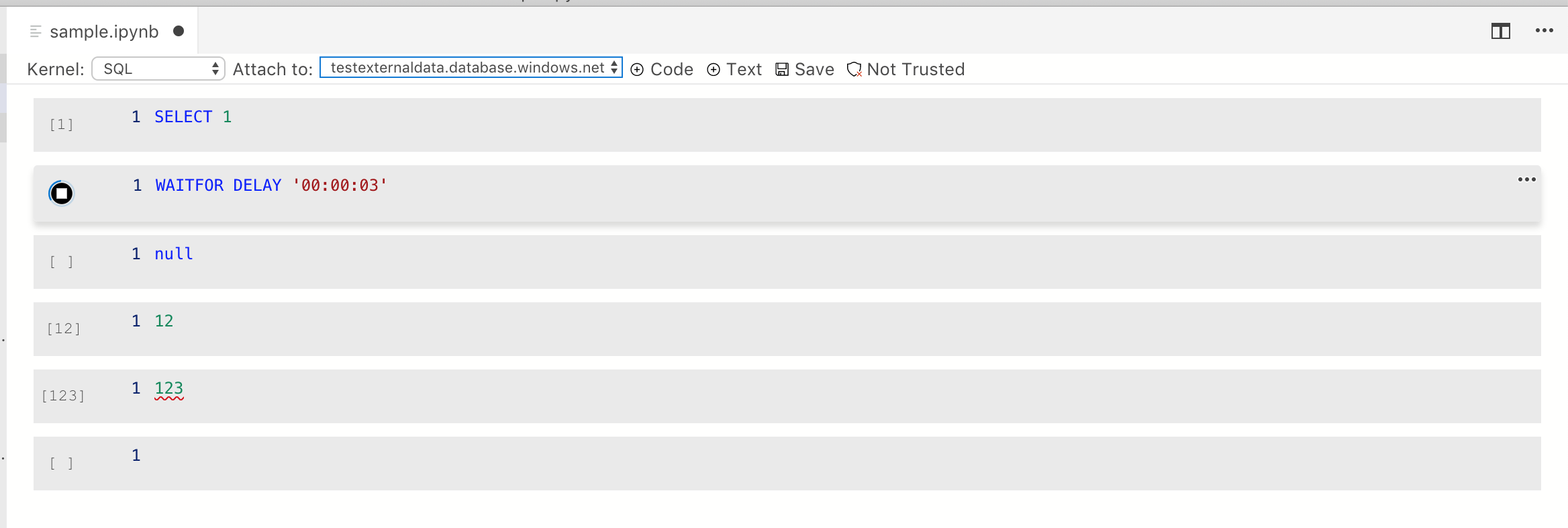
* Added hover support, adding box shadow and light outline on hovering and the "more actions" button showing on hover
* Added box shadow for dark themes (hooray!)
* Remove border from everything but the code cell unless a cell is selected or hovered over. This ensures this looks like a document
* Fix high contrast theming issues.
* Added toggle more actions to cell

* Resolve PR comments
-- Added INotificationService for notification msg

* Reduced ToggleMoreAction to smaller size. So the dropdown could be displayed closer to it instead of at the buttom of the cell.
* Initial toolbar work
- This is in-progress and needs additional fixes

* Resolve PR comments

* Added empty kernel and hook up with Kernel dropdown

* Resolve PR comments
* initial work for addig code and code cell type

* add cell model and create editor for each cell

* formatting

* fix resizing issue

* small changes

* address comment


