Fixes#3931
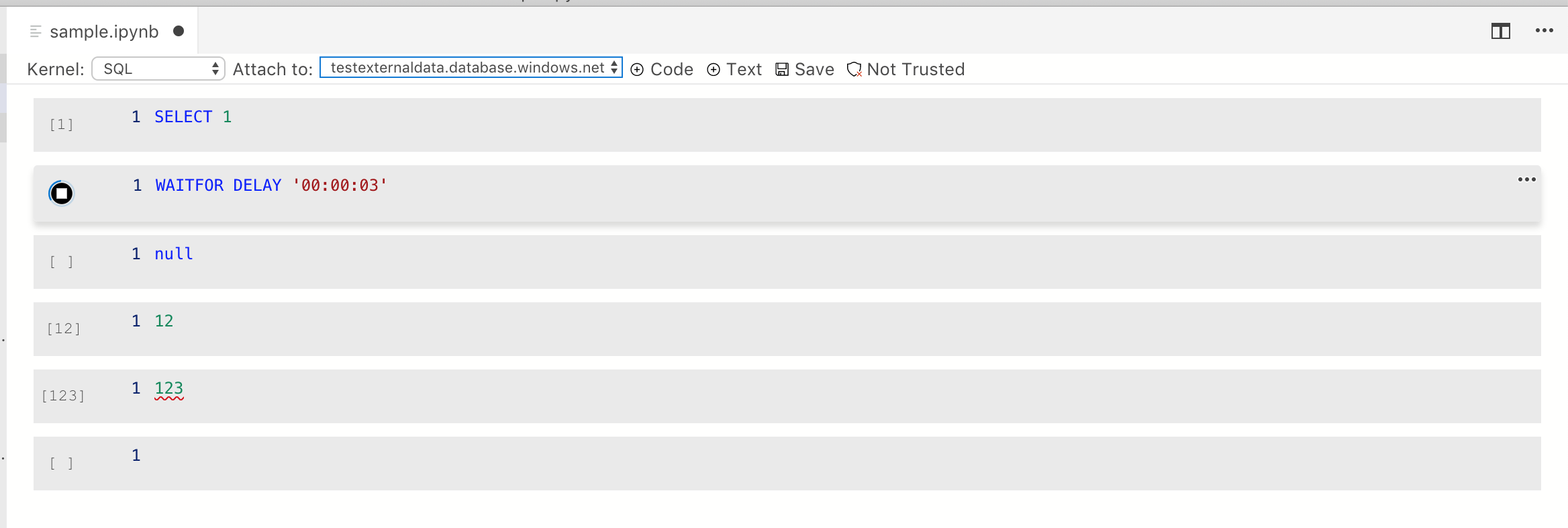
- Align run button correctly so it's centered in new cell
- Refactor to support multi-state button.
- Hidden state is set to show execution count
- Stopped state shows run button
- Running state shows stop button
- Error state (will) show error button. This isn't fully handled right now
- Add execution count to model and to SqlKernel, verify serialization, loading, update matches other notebook viewers
**Notes on implementation**:
I think this is a decent solution for a) showing execution count as text, and b) perfectly centering the run button.
The below solution shows count correctly up to 999 runs (that’s clicking 999 times in a single session), the icon lines up juuust about right with [ ] but for other numbers it is pretty close but probably not exactly right. I wish I could solve this to work better but trying to change text float to center etc. really isn’t working.
**Screenshots**:

With running cell:
- Added `runCell` API. Updated runCell button to listen to events on the model so it'll reflect run cell when called from other sources
- Plumbed through kernelspec info to the extension side so when changed, it's updated
- Fixed bug in ConnectionProfile where it didn't copy from options but instead overrode with empty wrapper functions

Here's the rough test code (it's in the sql-vnext extension and will be out in a separate PR)
```ts

    it('Should connect to local notebook server with result 2', async function() {
        this.timeout(60000);
        let pythonNotebook = Object.assign({}, expectedNotebookContent, { metadata: { kernelspec: { name: "python3", display_name: "Python 3" }}});
        let uri = writeNotebookToFile(pythonNotebook);
        await ensureJupyterInstalled();

        let notebook = await sqlops.nb.showNotebookDocument(uri);
        should(notebook.document.cells).have.length(1);
        let ran = await notebook.runCell(notebook.document.cells[0]);
        should(ran).be.true('Notebook runCell failed');
        let cellOutputs = notebook.document.cells[0].contents.outputs;
        should(cellOutputs).have.length(1);
        let result = (<sqlops.nb.IExecuteResult>cellOutputs[0]).data['text/plain'];
        should(result).equal('2');

        try {
            // TODO support closing the editor. Right now this prompts and there's no override for this. Need to fix in core
            // Close the editor using the recommended vscode API
            //await vscode.commands.executeCommand('workbench.action.closeActiveEditor');
        }
        catch (e) {}
    });

    it('Should connect to remote spark server with result 2', async function() {
        this.timeout(240000);
        let uri = writeNotebookToFile(expectedNotebookContent);
        await ensureJupyterInstalled();

        // Given a connection to a server exists
        let connectionId = await connectToSparkIntegrationServer();

        // When I open a Spark notebook and run the cell
        let notebook = await sqlops.nb.showNotebookDocument(uri, {
            connectionId: connectionId
        });
        should(notebook.document.cells).have.length(1);
        let ran = await notebook.runCell(notebook.document.cells[0]);
        should(ran).be.true('Notebook runCell failed');

        // Then I expect to get the output result of 1+1, executed remotely against the Spark endpoint
        let cellOutputs = notebook.document.cells[0].contents.outputs;
        should(cellOutputs).have.length(4);
        let sparkResult = (<sqlops.nb.IStreamResult>cellOutputs[3]).text;
        should(sparkResult).equal('2');

        try {
            // TODO support closing the editor. Right now this prompts and there's no override for this. Need to fix in core
            // Close the editor using the recommended vscode API
            //await vscode.commands.executeCommand('workbench.action.closeActiveEditor');
        }
        catch (e) {}
    });
});
```
* Scenarios work besides loading saved kernel

* Fix compilation issue

* Save and load functional

* Fix loading kernesl issue when sql kernel is not enabled

* Fix language mapping to not be hardcoded any longer

* Remove unnecessary comment

* PR Comments vol. 1

* Code cleanup, use ConnectionProfile instead of IConnectionProfile when accessing serverName

* PR changes vol. 2

* One final comment for PR

* Fix linting issue
* working on formatting

* fixed basic lint errors; starting moving things to their appropriate location

* formatting

* update tslint to match the version of vscode we have

* remove unused code

* work in progress fixing layering

* formatting

* moved connection management service to platform

* formatting

* add missing file

* moving more servies

* formatting

* moving more services

* formatting

* wip

* moving more services

* formatting

* revert back tslint rules

* move css file

* add missing svgs
* First crack tsql notebook (no output rendered yet)

* getting messages back

* intellisense working first cell, no connection errors

* sql notebook cell output functioning

* Latest SQL noteobook changes

* Undo change to launch.json

* Plumbing providers through

* Kernels shown from multiple providers, can switch between them. No mementos yet

* Ensure we have a feature flag for SQL notebooks, ensure existing functionality still works

* Fix tslint duplicate imports issue

* Addressing PR comments

* second round of PR feedback to cleanup notebook service manager code

* merge latest from master
* Handle delayed Notebook provider registration
- Fixes#3197 Notebooks: builtin provider always used on reopen with notebook file visible
- Fixes#3414 Can't refresh kernel after connect to big data cluster
There are 3 parts to this fix:
- If no notebook provider other than the default is installed, we warn users and prompt to install the SQL2019 extension
- We wait on the extension host registration to complete before determining which provider to use
- We know that the extension registration of the provider instance will be after package.json is read, so if we wait after registration for 10 seconds to give this a chance to happen before returning a provider to the front end
* Remove launch.json change that was added accidentally
* Fix timeout not being the expected value
* Removed console log left in during debugging
* Remove unnecessary whitespace
* Fix unit test failure
* Name the registration better, and remove outdated comments
* Notebook saves are broken #3432

* Misc change

* Save notebook uri to This

* Untitled notebook save including review comments #3432

* Cleanup

* Misc changes
- Add edit API that can be used in the extension
- Separated document and editor classes out since this is the point those get big. I can refactor back in if needed to ease code review
- Based this off text editing APIs but tweaked for the fact this is a cell/array based set of edits
initial support for Notebook extensibility. Fixes#3148 , Fixes#3382.
## Design notes
The extensibility patterns are modeled after the VSCode Document and Editor APIs but need to be different since core editor concepts are different - for example Notebooks have cells, and cells have contents rather than editors which have text lines.
Most importantly, a lot of the code is based on the MainThreadDocumentsAndEditors class, with some related classes (the MainThreadDocuments, and MainThreadEditors) brought in too. Given our current limitations I felt moving to add 3 full sets of extension host API classes was overkill so am currently using one. Will see if we need to change this in the future based on what we add in the additional APIs
## Limitations
The current implementation is limited to visible editors, rather than all documents in the workspace. We are not following the `openDocument` -> `showDocument` pattern, but instead just supporting `showDocument` directly.
## Changes in this PR
- Renamed existing APIs to make clear that they were about notebook contents, not about notebook behavior
- Added new APIs for querying notebook documents and editors
- Added new API for opening a notebook
- Moved `New Notebook` command to an extension, and added an `Open Notebook` command too
- Moved notebook feature flag to the extension
## Not covered in this PR
- Need to actually implement support for defining the provider and connection IDs for a notebook. this will be important to support New Notebook from a big data connection in Object Explorer
- Need to add APIs for adding cells, to support
- Need to implement the metadata for getting full notebook contents. I've only implemented to key APIs needed to make this all work.


