Fixes#3931
- Align run button correctly so it's centered in new cell
- Refactor to support multi-state button.
- Hidden state is set to show execution count
- Stopped state shows run button
- Running state shows stop button
- Error state (will) show error button. This isn't fully handled right now
- Add execution count to model and to SqlKernel, verify serialization, loading, update matches other notebook viewers
**Notes on implementation**:
I think this is a decent solution for a) showing execution count as text, and b) perfectly centering the run button.
The below solution shows count correctly up to 999 runs (that’s clicking 999 times in a single session), the icon lines up juuust about right with [ ] but for other numbers it is pretty close but probably not exactly right. I wish I could solve this to work better but trying to change text float to center etc. really isn’t working.
**Screenshots**:

With running cell:
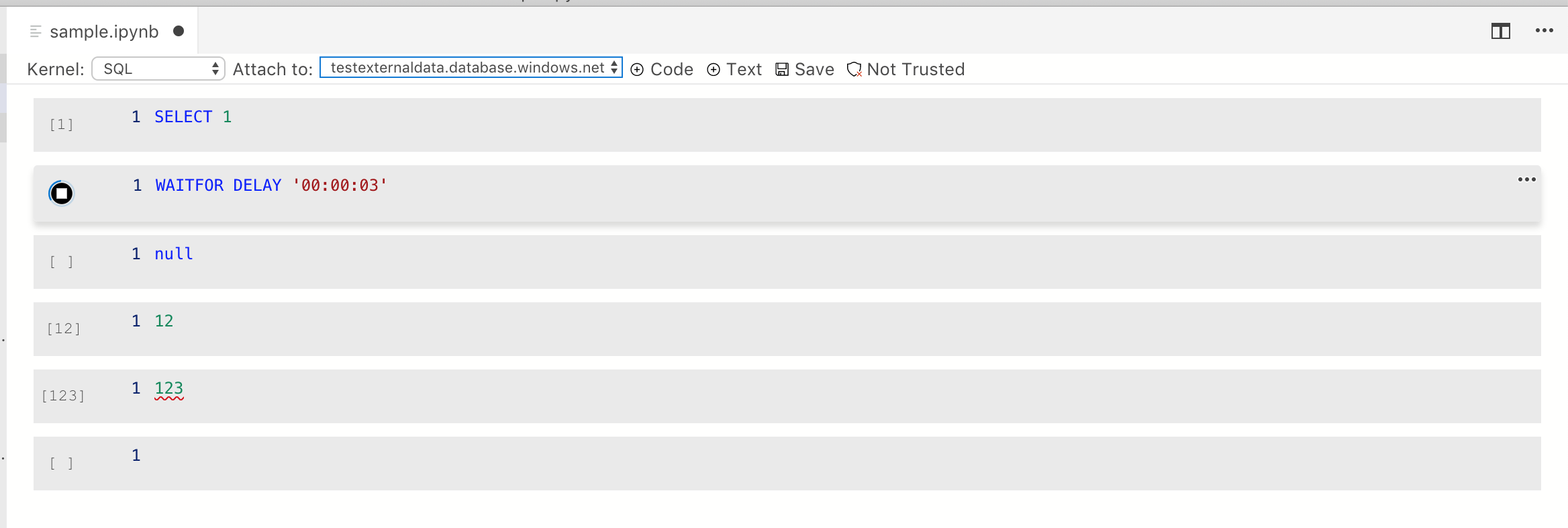
- Handles empty file scenario, with fixes along the way for missing metadata (bonus win)
- In non-empty file still shows error and kernel stuck in loading state. #3964 opened to track this issue and fix later
This was reviewed / worked on with Smitha and will be signed off on by PM via mail.
1 thing left (make run button look better when not selected) will be one in separate review.

Changes
- Add top/bottom padding to editor so it's not cramped
- Added an (on by default) setting `notebook.overrideEditorTheming`. This controls whether new colors etc. are used for notebook editors or if users should see vanilla UI like in standard editor. Settings under this flag are:
  - When unselected, editor has same color as toolbar. On selection it goes back to regular editor view so colors work "right"
  - In standard light/dark themes we now use a filled in background color instead of border box.
- SQLKernel is the only place to listen for batch and query complete messages now
- It routes to the 1 and only future (since can only have 1 at a time
- It handles query cancelation and not-connected issues correctly
- Toolbar background is now differentiated from the editor
- For unselected cells there's no longer a line selection in the cell. This makes it clearer what the active cell is (and cleans the UI up)
Fixes#3856. Matches the Jupyter behavior that we have, where we don't show any message when a connection is required. We no longer will throw a bizarre exception about getOptionsKey being undefined.
Also sets max rows returned to 2000.
* First grid support in notebooks

* still trying to get nteract ipynb to display grid correctly

* works opening with existing 'application/vnd.dataresource+json' table

* fixing merge issue due to core folder structure changing a bit

* PR feedback, fix for XSS
- Added `runCell` API. Updated runCell button to listen to events on the model so it'll reflect run cell when called from other sources
- Plumbed through kernelspec info to the extension side so when changed, it's updated
- Fixed bug in ConnectionProfile where it didn't copy from options but instead overrode with empty wrapper functions

Here's the rough test code (it's in the sql-vnext extension and will be out in a separate PR)
```ts

    it('Should connect to local notebook server with result 2', async function() {
        this.timeout(60000);
        let pythonNotebook = Object.assign({}, expectedNotebookContent, { metadata: { kernelspec: { name: "python3", display_name: "Python 3" }}});
        let uri = writeNotebookToFile(pythonNotebook);
        await ensureJupyterInstalled();

        let notebook = await sqlops.nb.showNotebookDocument(uri);
        should(notebook.document.cells).have.length(1);
        let ran = await notebook.runCell(notebook.document.cells[0]);
        should(ran).be.true('Notebook runCell failed');
        let cellOutputs = notebook.document.cells[0].contents.outputs;
        should(cellOutputs).have.length(1);
        let result = (<sqlops.nb.IExecuteResult>cellOutputs[0]).data['text/plain'];
        should(result).equal('2');

        try {
            // TODO support closing the editor. Right now this prompts and there's no override for this. Need to fix in core
            // Close the editor using the recommended vscode API
            //await vscode.commands.executeCommand('workbench.action.closeActiveEditor');
        }
        catch (e) {}
    });

    it('Should connect to remote spark server with result 2', async function() {
        this.timeout(240000);
        let uri = writeNotebookToFile(expectedNotebookContent);
        await ensureJupyterInstalled();

        // Given a connection to a server exists
        let connectionId = await connectToSparkIntegrationServer();

        // When I open a Spark notebook and run the cell
        let notebook = await sqlops.nb.showNotebookDocument(uri, {
            connectionId: connectionId
        });
        should(notebook.document.cells).have.length(1);
        let ran = await notebook.runCell(notebook.document.cells[0]);
        should(ran).be.true('Notebook runCell failed');

        // Then I expect to get the output result of 1+1, executed remotely against the Spark endpoint
        let cellOutputs = notebook.document.cells[0].contents.outputs;
        should(cellOutputs).have.length(4);
        let sparkResult = (<sqlops.nb.IStreamResult>cellOutputs[3]).text;
        should(sparkResult).equal('2');

        try {
            // TODO support closing the editor. Right now this prompts and there's no override for this. Need to fix in core
            // Close the editor using the recommended vscode API
            //await vscode.commands.executeCommand('workbench.action.closeActiveEditor');
        }
        catch (e) {}
    });
});
```
* Scenarios work besides loading saved kernel

* Fix compilation issue

* Save and load functional

* Fix loading kernesl issue when sql kernel is not enabled

* Fix language mapping to not be hardcoded any longer

* Remove unnecessary comment

* PR Comments vol. 1

* Code cleanup, use ConnectionProfile instead of IConnectionProfile when accessing serverName

* PR changes vol. 2

* One final comment for PR

* Fix linting issue
* working on formatting

* fixed basic lint errors; starting moving things to their appropriate location

* formatting

* update tslint to match the version of vscode we have

* remove unused code

* work in progress fixing layering

* formatting

* moved connection management service to platform

* formatting

* add missing file

* moving more servies

* formatting

* moving more services

* formatting

* wip

* moving more services

* formatting

* revert back tslint rules

* move css file

* add missing svgs
 Kevin Cunnane

