- This is a recommended update, let me know if you have concerns
- Updated all samples and Azure Data Studio specific extensions with lodash dependency
Fixes#3931
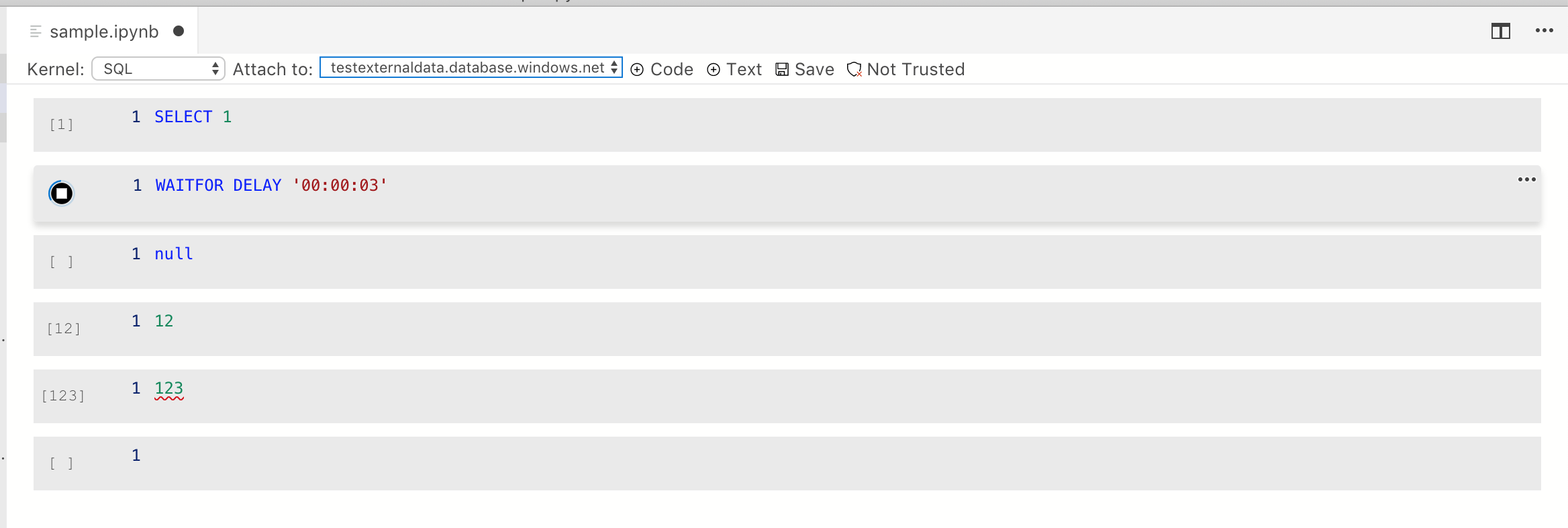
- Align run button correctly so it's centered in new cell
- Refactor to support multi-state button.
- Hidden state is set to show execution count
- Stopped state shows run button
- Running state shows stop button
- Error state (will) show error button. This isn't fully handled right now
- Add execution count to model and to SqlKernel, verify serialization, loading, update matches other notebook viewers
**Notes on implementation**:
I think this is a decent solution for a) showing execution count as text, and b) perfectly centering the run button.
The below solution shows count correctly up to 999 runs (that’s clicking 999 times in a single session), the icon lines up juuust about right with [ ] but for other numbers it is pretty close but probably not exactly right. I wish I could solve this to work better but trying to change text float to center etc. really isn’t working.
**Screenshots**:

With running cell:
* added initial data explorer viewlet

* added dataexplorer contribution point

* removed test view

* remove unused imports

* added flag and tests

* CR comments

* added icon for data explorer
* upgrade plan is piped through and returns the xml plan

* Added review deploy plan page

* checkbox validation now working and columns formatted

* formatting and cleaning up code

* refactored populateTable()

* addressing comments

* addressing comments

* updating tooltips

* add padding to table cells to align with headers

* fix problems when going back and forth between pages and changing config options

* bump sqltoolsservice version to 71

* fix localization
- Handles empty file scenario, with fixes along the way for missing metadata (bonus win)
- In non-empty file still shows error and kernel stuck in loading state. #3964 opened to track this issue and fix later
- Fixed so it's now invisible instead of empty when not selected.
 - This fixes clickability and issue where it stayed visible in 1 fix
- Also fixed cell output action which used active cell instead of context cell.
* Spark features are enabled

* Fixed as PR comments

* minor change

* PR comments fixed

* minor fix

* change constant name to avoid conflicts with sqlopsextension

* sqlContext to context

* Changed tab name to SQL Server Big Data Cluster

* Added isCluster to ContextProvider to control display big data cluster dashboard tab
Ported New/open Notebook code to mssql extension and enable them in dashboard

* Fixed tslint
This was reviewed / worked on with Smitha and will be signed off on by PM via mail.
1 thing left (make run button look better when not selected) will be one in separate review.

Changes
- Add top/bottom padding to editor so it's not cramped
- Added an (on by default) setting `notebook.overrideEditorTheming`. This controls whether new colors etc. are used for notebook editors or if users should see vanilla UI like in standard editor. Settings under this flag are:
  - When unselected, editor has same color as toolbar. On selection it goes back to regular editor view so colors work "right"
  - In standard light/dark themes we now use a filled in background color instead of border box.
* Added hover support, adding box shadow and light outline on hovering and the "more actions" button showing on hover
* Added box shadow for dark themes (hooray!)
* Remove border from everything but the code cell unless a cell is selected or hovered over. This ensures this looks like a document
* Fix high contrast theming issues.
* Ported Analyze notebook code from SqlOpsStudio and make it work.
if config.notebook.sqlKernelEnabled is true, use SQL provider;
Use Jupyter provider if Python is install, otherwise use buildIn Kernel.

* Analyze in Notebook Kernel can only be Python or "No Kernel". So remove Sql Kernel.
- SQLKernel is the only place to listen for batch and query complete messages now
- It routes to the 1 and only future (since can only have 1 at a time
- It handles query cancelation and not-connected issues correctly
- Editor layout gets called sometimes when other events happen (and Notebook isn't visible)
- Add in a layout call on re-setting input so the cell is updated. This fixes the problem by laying out once the UI is visible again.

Note: long term, should really be destroying the UI (while preserving the model), then restoring it including scroll selection etc. and hooking back up to the model. That is... much more work, but something we'll need long term to avoid issues where we have many Notebooks open at once. Not in scope for this PR
- Toolbar background is now differentiated from the editor
- For unselected cells there's no longer a line selection in the cell. This makes it clearer what the active cell is (and cleans the UI up)
* Added data service context menu: file related operations. All new files are ported from SqlOpsStudio. Will remove these functionality from SqlOpsStudio.

* Used the existing constant hadoopKnoxEndpointName

* Rename nodeType name from hdfs to bdc. So we can have file context menu in both mssql and SqlOpsStudio. Need to add "Create External Table from CSV" support for bdc nodeType

* Rename bdc to mssqlcluster
Fixing an issue where we got a 501 Not Implemented because kernel display name sanitization was not occurring with the _defaultKernel case.

In addition, changed a method name to make it more clear, and removed an erroneous error that would occur every time you opened a notebook without any existing connections. I'm just removing this, as it adds no value.
Fixes#3856. Matches the Jupyter behavior that we have, where we don't show any message when a connection is required. We no longer will throw a bizarre exception about getOptionsKey being undefined.
Also sets max rows returned to 2000.


